Fundraisers & Charity Nights
Door-pass ticketing, volunteers as cashiers, and a treasurer-ready report the same night.
One benefit night, two ways
The same benefit night, run the way a volunteer committee always has, and the way it runs on the platform.
| Before | With RojoBingo | |
|---|---|---|
| Selling admission | A cash box and a hand-written guest list at the door | QR tickets printed in a batch, buyer names already on them, sold as a package or by credit |
| Running the game | A caller with a script and a volunteer keeping score by hand | Auto-called at your pace, with a caller option if your group would rather run it by hand |
| Cashiering volunteers | Training a volunteer on a register they'll use once a year | The cashier role runs on any phone they already carry — no register to buy |
| Supporters who can't attend | Missing out entirely | Play from home where local regulations allow, with LiveStream putting your caller on camera |
| Reporting to the board | Reconciling a cash box the next morning | A per-cashier report and a CSV ready for the treasurer the moment the last game settles |
The stack for a benefit night
How a night runs
A benefit night, start to finish
Package tiers go into the program editor once — admission, cards free every game, or switch the venue to credit instead.
A batch of QR tickets prints with buyer names already on them, as a PDF or a CSV for the print shop.
Volunteers are invited as cashiers by e-mail for the night only; PIN-approved cash-outs work from any phone.
The night settles into a per-cashier report and a CSV for the treasurer, with a fairness proof behind every result.
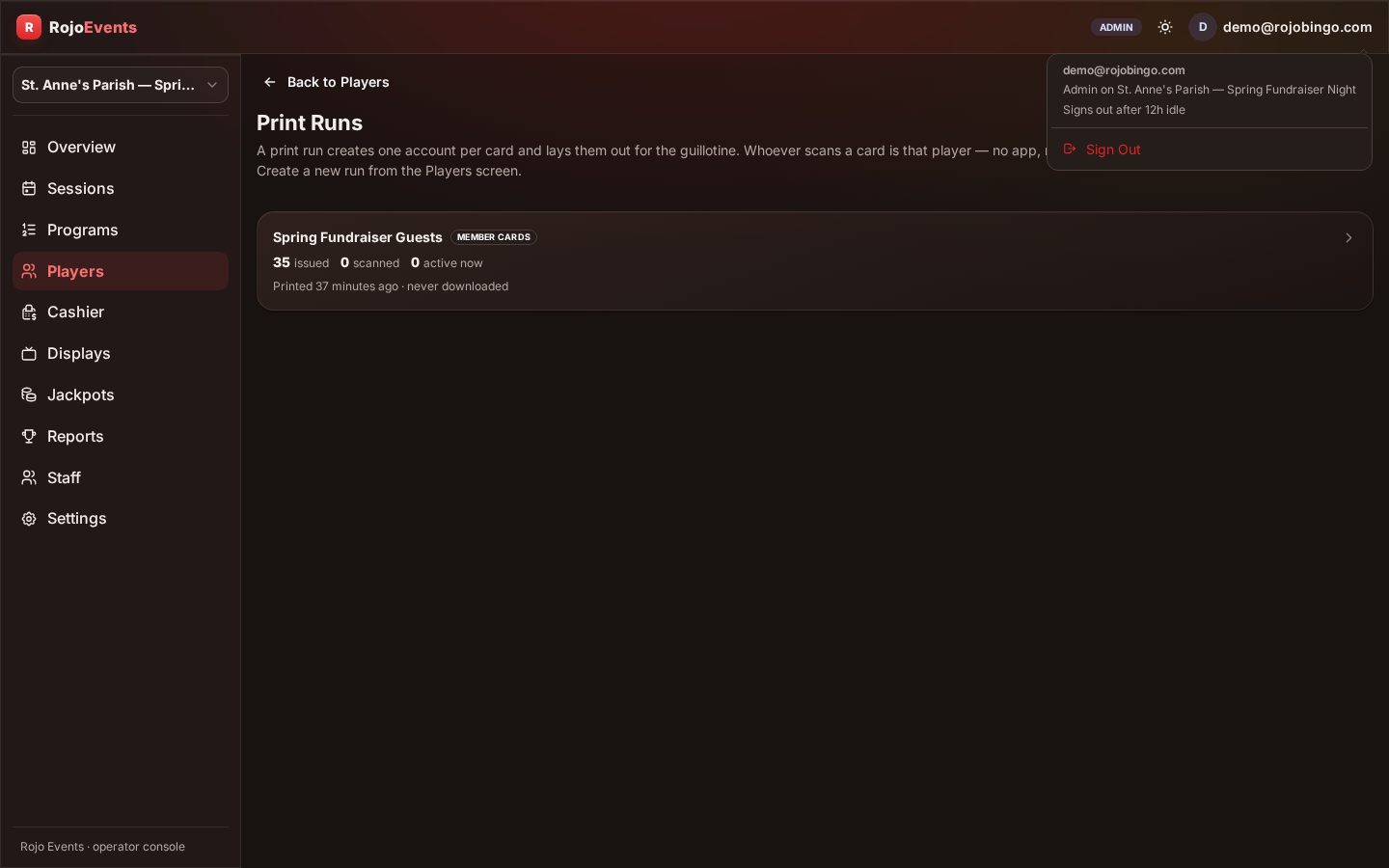
A whole batch of tickets, ready for the door
The entire run prints at once, with buyer names already on it — nothing to write by hand at check-in.
Supporters playing from home
Where local regulations allow, a ticket sold at the door also works off-site — the same QR link opens on any phone.
Cards auto-daub as balls are called; one BINGO button does the rest, no app to install.
Add LiveStream and supporters watch your caller call the game live, from wherever they are.
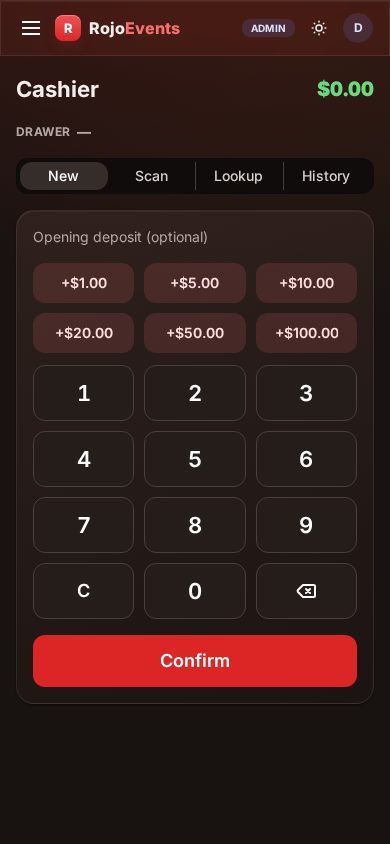
The night's register, on a volunteer's phone
No volunteer needs training on a cash register — they sell, scan tickets and approve PIN cash-outs from the phone they already carry.
A recurring series
A progressive jackpot carries forward from one benefit night to the next instead of resetting each time.
Copy last event's program to set up the next one in a tap.
Each event still closes with its own per-cashier report and CSV, kept separate for the board.
A sample 8-game benefit program
75-ball, benefit format with package admission. Browse the full 195-pattern library →
| Game | Ball | Pattern | Jackpot | Notes |
|---|---|---|---|---|
| 1 | 75 | Any Line | — | Package admission opener |
| 2 | 75 | Four Corners | — | |
| 3 | 75 | Letter X | — | |
| 4 | 75 | Postage Stamp | Moneyball | |
| 5 | 75 | Any Six-Pack (2×3 / 3×2 block) | — | |
| 6 | 75 | Layer Cake | — | |
| 7 | 75 | Diamond | Designated-number | |
| 8 | 75 | Coverall (Full House) | — | Finale |
Programs are fully configurable — ball types, patterns, prices and payouts are yours to set.
Every game issues cards free under the package, or sells by credit if that's how the venue is set.
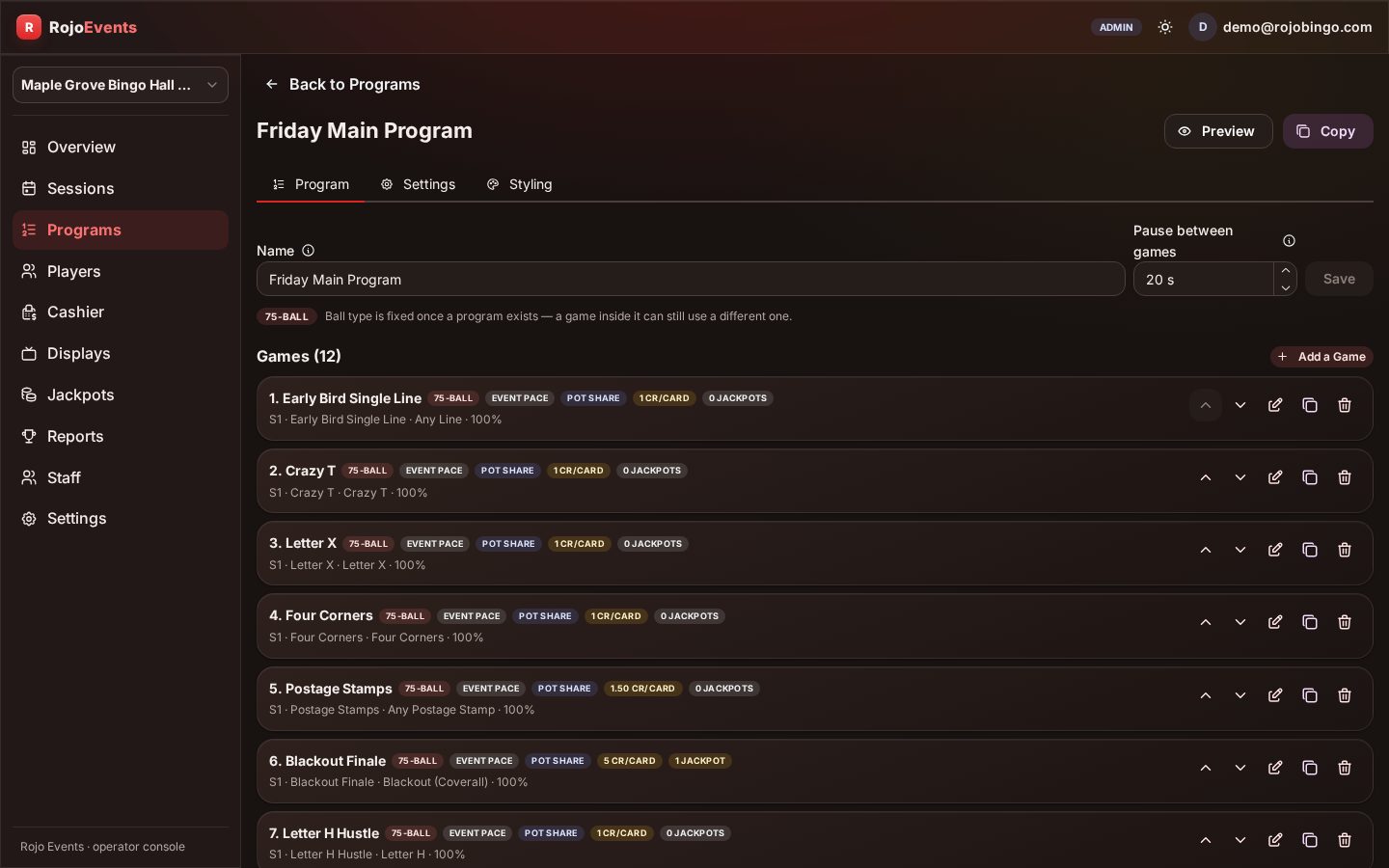
An editor, not a spreadsheet
Package tiers, patterns and the moneyball are set once — and the same program copies forward for the next event in the series.
Your configuration
This is what we set up with you — here is the exact shape it takes for a benefit night.
Recommended settings
| Setting | Recommended for a benefit night |
|---|---|
| Money model | Door-pass package tiers |
| Automation | Auto-called, with a caller option if your group prefers to run it by hand |
| Call pace | Auto-called at a set pace, within the 2 to 30 second range |
| Winner mode | Shared payout, every game |
| Ball types | 75-ball |
| Jackpots | Moneyball, with a coverall as the night's finale |
| Session cadence | Per event — the program copies forward to the next one in the series |
| Languages | English, Spanish and French on kiosk and TV |
Volunteers are invited by e-mail for the night only, with access revoked the moment the event closes.
Your first session
- Organization & venue — Created once.
- Money model — Package tiers, or pay-per-game credit.
- Program — Built from scratch, or copied from the series' last event.
- Tickets printed — A batch of QR tickets, with buyer names already on them.
- TVs paired — If your venue uses TVs.
- Volunteers invited — By e-mail, for the night only.
- Doors — Open.
Who's on shift
A benefit night doesn't need a single paid employee — the whole shift is covered by volunteers from your own group.
| Role | On shift | What they do |
|---|---|---|
| Volunteer cashiers | 2-4, however many doors you want open | Sell and scan tickets, approve PIN cash-outs, each with their own report |
| Caller | Optional | The program runs auto-called by default; add a caller if your group would rather run it by hand |
What this does for the business
A benefit night's economics are set the moment the tiers go into the editor: package admission with cards free every game, or pay-as-you-go credit if that suits your crowd better. A moneyball or designated-number jackpot gives supporters a reason to stay for the finale, and a progressive pool can carry the incentive from one event to the next. Where local regulations allow, the same ticket still works off-site for supporters who can't attend in person, with no second sales channel to open, and LiveStream puts your caller on camera for them. None of it requires a merchant account or a volunteer who understands payment processing: the money runs through the same platform, start to finish.
You set your prices and payouts and keep your revenue. Straightforward per-player pricing for digital events — sell as many cards per player as you like. No cut of prizes — we license the software.
Operators run under the rules and regulations of their local jurisdiction.
Tell us the date, the format and a rough head count, and we set up your organization's first program with you — patterns, prices, jackpots. See the full platform walkthrough →, or see pricing →. Curious how pricing works for a one-night event? Read How does pricing work? →.
What fundraisers ask before switching
None of our volunteers have run a register before — is that a problem?
No — the cashier role runs on any phone a volunteer already carries, with no register to buy and no training beyond an afternoon.
Is this only for one-off events, or can we run a series?
Both — a single benefit night closes its own books, or a recurring series can carry a progressive jackpot from one event to the next.
What does our treasurer receive?
A per-cashier report and a CSV export, ready the moment the last game settles, with a fairness proof behind every result.
Can supporters who can't attend still take part?
Where local regulations allow, yes — the same ticket works from home, and adding LiveStream puts your caller on camera for them. Where they don't, they can still watch the game live on LiveStream.
Do we still need a cash box at the door?
No — admission sells as a package or by credit, and every sale gets a receipt instead of a line in a cash box.
What if we've never organized anything like this before?
We walk you through the first program end to end, so the first event runs just as smoothly as an experienced group's fifth one.
Bring RojoBingo to your venue
RojoConsole runs the game — caller-run or fully automated — with streaming and loyalty on the same platform. Concierge launch in days.