Community Organizations
Clubs, schools, churches and workplaces — a professional bingo night on the phones everyone already carries.
Your club night today, before and after
The same social gathering, run two different ways — whether it's your club's weekly game or the school's once-a-year fundraiser.
| Before | With RojoBingo | |
|---|---|---|
| Running the game | A volunteer calls numbers off a card by hand, hoping nobody mishears one | The volunteer can still call it by hand — or switch on auto-call and simply watch the room |
| Cards | Paper cards, sold and tallied at a table by the door | A QR code or link opens the game on the phone everyone already has — no printing, no collecting cards back |
| Displaying the game | Numbers called out loud, or written on a whiteboard | A projector or TV shows a shared flashboard, kept in sync automatically |
| Money at the door | A cash box and a hand-written tally for the treasurer | A door pass sold from one phone, with a report ready the moment the night ends |
| Recurring nights | Next month's night starts from a blank sheet | Copy last month's program in a tap and open the doors |
The stack for a community night
RojoConsole For Events runs a club or community night end to end, with no third-party ticketing tool or cash box on the side.
How a night runs
Three groups, the same program tailored to each. Every one keeps its own rhythm — a volunteer calling by hand, an engine calling itself, or something in between.
A club social night
Calls the game by hand from a tablet, or switches on auto-call and watches the room instead.
A QR code or link opens the game — no app, no cards to hand out or collect.
A TV or projector displays the shared flashboard, kept in sync with every call.
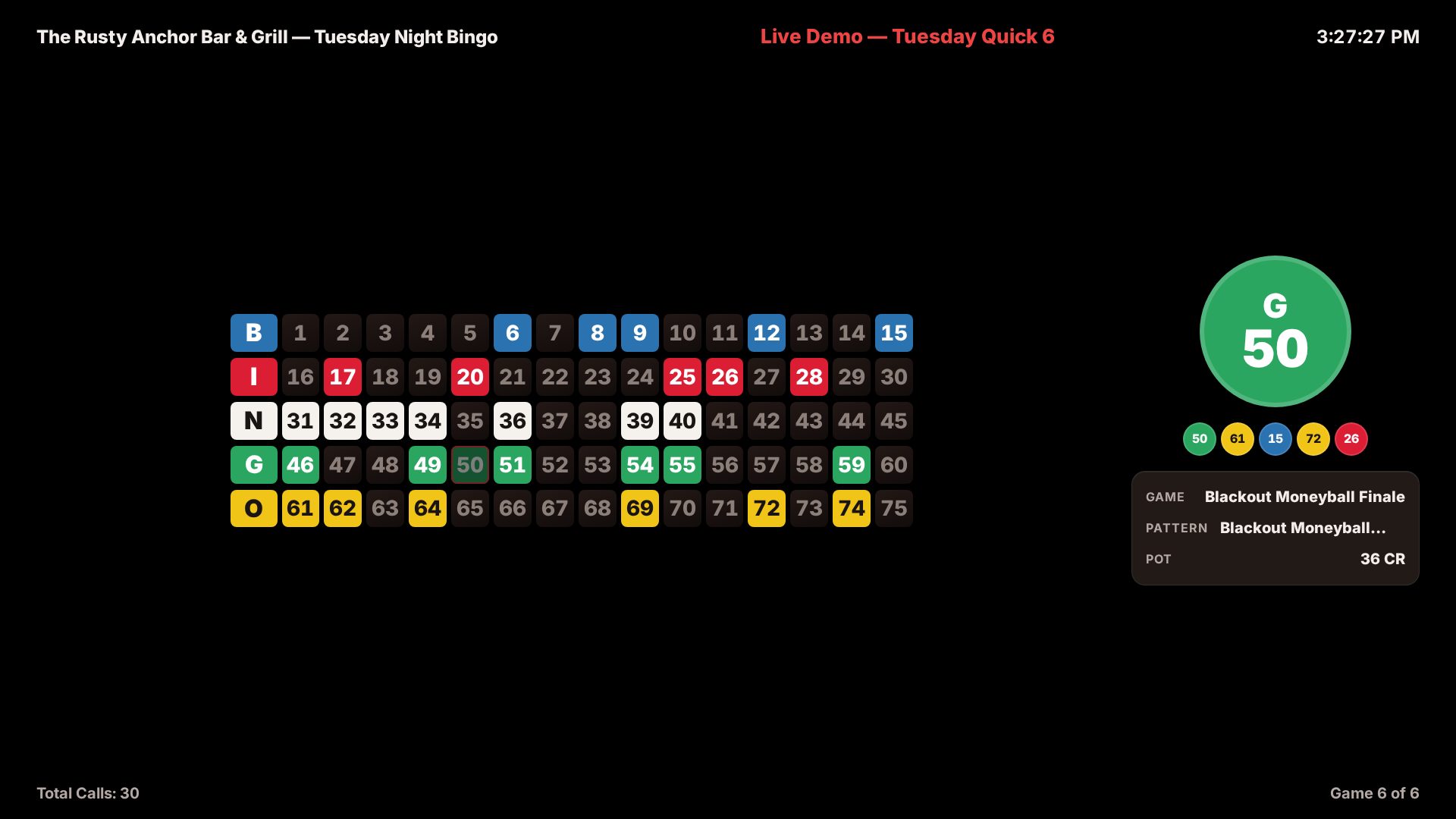
Whatever TV or projector you already have
Nothing to install on the screen — the board syncs itself with every ball called, on the TV or projector the group already uses.
A school or church benefit
One phone cashiers the door — admission included, cards free every game.
Nobody on the committee has to learn to call; the engine runs the whole night.
Winners, sales and a report for the treasurer are ready before everyone goes home.
A workplace social
A link in a group chat or e-mail is the whole invitation — everyone already has the phone they'll play on.
Auto-called games need no volunteer caller at all — just someone to watch the room.
Short programs fit a lunch break or an after-work hour without anyone staying late to count cash.
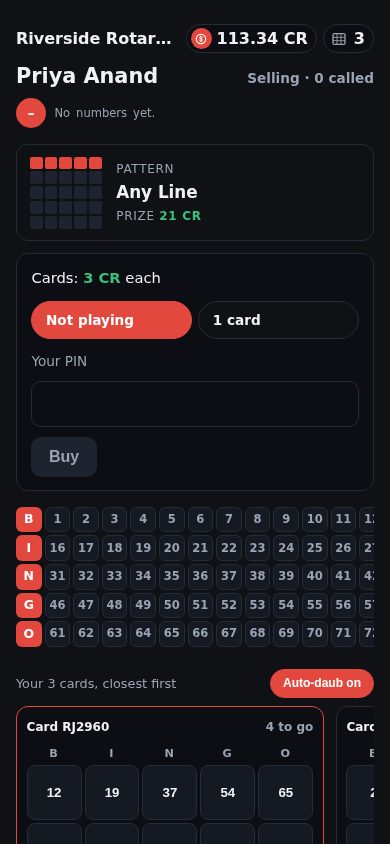
The phone everyone already carries is the only equipment
A link opens the game in a phone's browser — no app to install, no paper card to hand out.
A sample 6-game program
A short, social program, auto-called.
Club night program — 75-ball, auto-called
| Game # | Type | Pattern | Jackpot | Notes |
|---|---|---|---|---|
| 1 | 75-ball | Four Corners | — | Warm-up, shared win |
| 2 | 75-ball | Top Line | — | Shared win |
| 3 | 75-ball | Postage Stamp | — | Shared win |
| 4 | 75-ball | Letter X | — | Shared win |
| 5 | 75-ball | Any Diagonal | — | Shared win |
| 6 | 75-ball | Blackout (Coverall) | — | Full-house finale, shared win |
Programs are fully configurable — ball types, patterns, prices and payouts are yours to set.
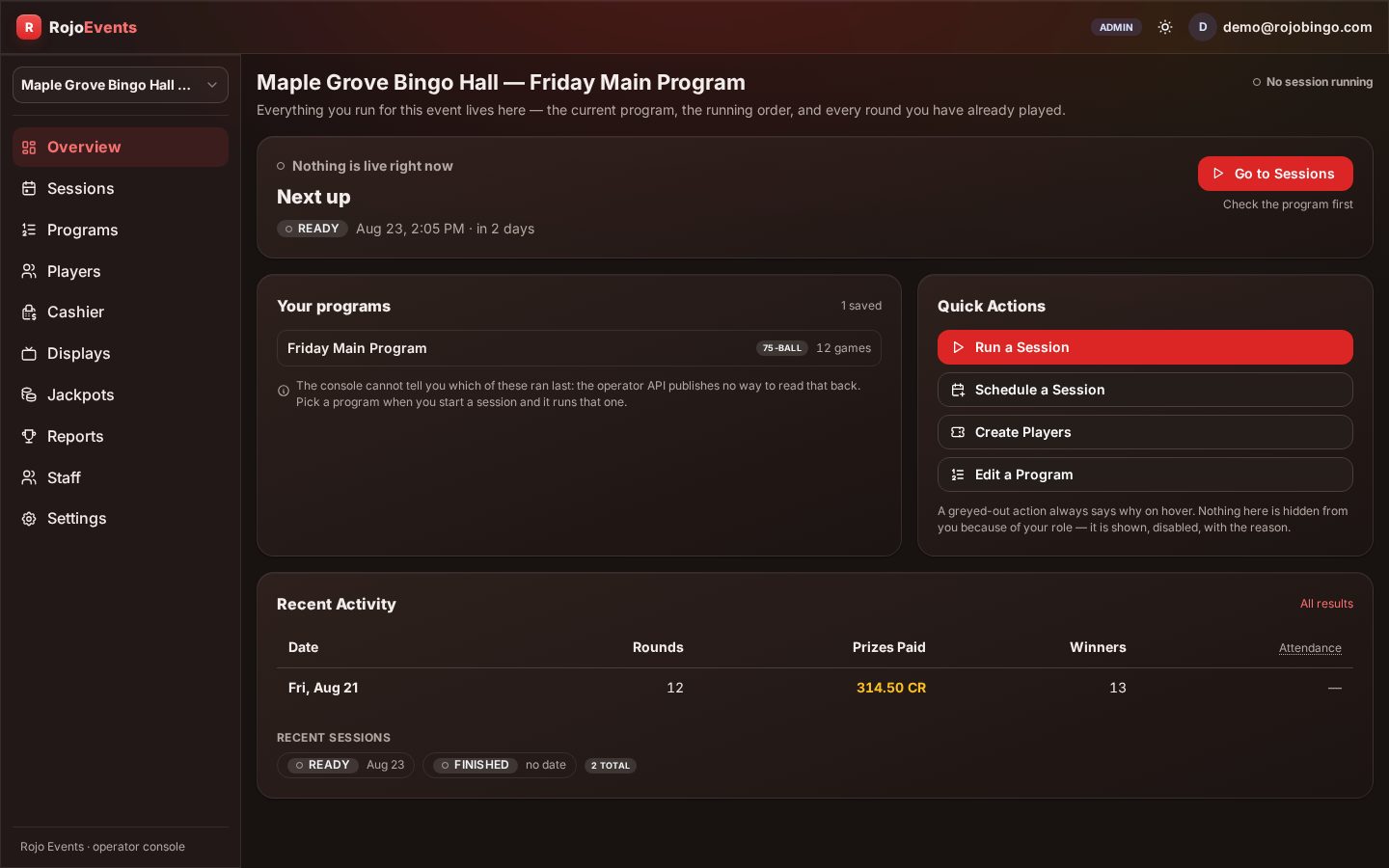
One screen, no experience required
Calling the game, confirming a BINGO or switching on auto-call is one tap — anyone on the committee learns it in an afternoon.
Your configuration
This is what we set up with you — here is the exact shape it takes for a community group.
Recommended settings
| Setting | Recommended for a community group |
|---|---|
| Money model | Credit, or free cards for a practice night |
| Automation | Volunteer calling by hand, or auto-call |
| Call pace | Mixed — the volunteer's own pace, or 2 to 30 seconds on auto |
| Winner mode | Shared payout |
| Ball types | 75-ball |
| Jackpots | Simple — none by default, moneyball optional |
| Session cadence | Per event |
| Languages | English, Spanish and French wherever you use a kiosk or TV |
Roles are invited by e-mail, with an expiry date you set.
Your first session
- Organization & venue — Created once.
- Money model — Credit, or everything free for a practice night.
- Program — Built from scratch, or copied from last month.
- Link or QR code — Ready to share in a group chat or e-mail — no tickets or terminals to prep.
- TV paired — If the group uses a shared screen.
- Roles invited — By e-mail, with the expiry you set.
- Doors — Open.
Who's on shift
One volunteer, or none at all — never a dedicated role, even on the busiest night of the year.
| On shift | What they do | |
|---|---|---|
| Volunteer-called night | One volunteer | Calls the game from a tablet and confirms claims |
| Auto-called night | One volunteer or cashier | Sells the door pass and watches the room; the engine runs the game |
What this does for the business
- A door-pass package covers admission for the whole night, with cards free every game.
- Prefer pay-as-you-go instead? Switch the venue to credit sales any time.
- A per-cashier report is ready for the treasurer or board the moment the night ends.
- Recurring nights can carry a jackpot pool from one event to the next.
- No volunteer has to keep the count by hand — the cashier report always reconciles itself.
You set your prices and payouts and keep your revenue. Straightforward per-player pricing for digital events — sell as many cards per player as you like. No cut of prizes — we license the software.
Operators run under the rules and regulations of their local jurisdiction.
Most groups run their first night within days. We help set up your program and invite your volunteers, and nobody on the committee needs a technical background to run it.
What community organizations ask before switching
What equipment do we need?
A phone or tablet for whoever runs the console, and any phone in the room for players — a projector or TV is optional, not required.
None of our volunteers are technical — is that a problem?
No. The console is built for a first-time volunteer, and auto-call means nobody has to call the game by hand at all.
Our group is small — is this still worth it?
Yes. The same console runs a table of six or a hall of two hundred; you only pay for the night you run, with no long-term contract to justify to the board.
Can we run a free practice night before charging admission?
Yes — set every card to free for a night, or run the full program with no door pass at all, to let your group try it first.
Bring RojoBingo to your venue
RojoConsole runs the game — caller-run or fully automated — with streaming and loyalty on the same platform. Concierge launch in days.